Startup Sales: How To Find Anyone's Email Address In 60 Seconds



Knowing your target market and audience is important. But executing is often the hardest part – once you’d found the right person to reach out to, how do you find their email?
I recently helped a fellow YC S19 startup with a user interview around our outbound sales workflow. They wanted to see my workflow for finding companies that are good fits for Freshpaint, finding the right individuals at those companies, and then contacting those individuals. There was some surprise from these founders at my method for finding a person’s email address. It’s nothing fancy, but does save a lot of time if someone’s email isn’t publicly available.
Here’s how to find anyone’s email
There are only a handful of permutations that companies use for their email addresses. The formats of email addresses are all common – the trick is finding the correct format. It’s usually very easy and quick, and only occasionally requires some additional thinking.
The most common company email formats are:
1. firstname@company.com
Example: steven@freshpaint.io
2. firstinitial+lastname@company.com
Example: sfitzsimmons@freshpaint.io
3. firstname+lastname@company.com
Example: stevenfitzsimmons@freshpaint.io
4. firstname.lastname@company.com
Example: steven.fitzsimmons@freshpaint.io
5. firstname_lastname@company.com
Example: steven_fitzsimmons@freshpaint.io
Some less common company email formats you could try:
1. firstname+lastinitial@company.com
Example: stevenf@freshpaint.io
2. lastname+firstinitial@company.com
Example: fitzsimmonss@freshpaint.io
If you’re selling to an early stage startup, chances are firstname@company.com will be successful 90%+ of the time.
How to verify you have the correct email
Bounces are annoying and waste time. If you’re trying to send out 30, 50, or even 100 high-quality, targeted outbound emails per day, then even minor inefficiencies to your workflow can be frustrating and disruptive.
Here’s how to verify that you have the correct email format for someone:
- Type out the person's email in gmail.
- Hover your mouse over the email address
- If it's correct, it will display the person's name or show their photo
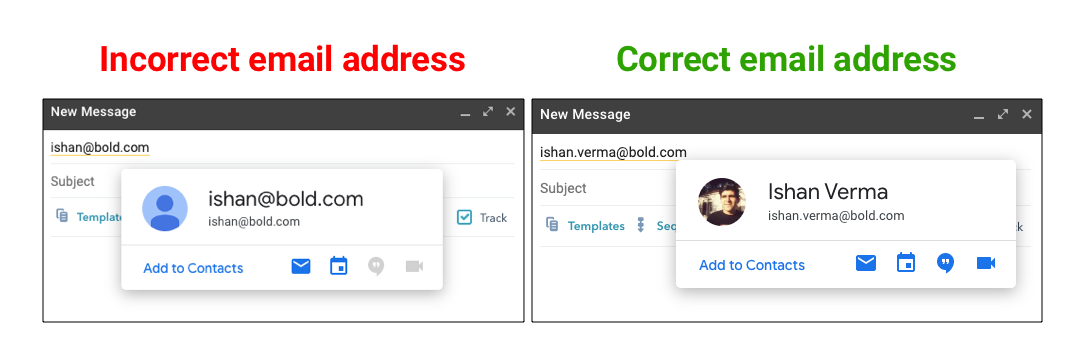
Even if the person's name or photo do not appear, you may still have the correct email address. Try other formats to see if you're able to verify something different. If you're not able to verify something in gmail before you send, send your best guess and see if it bounces. It's also a good idea to track opens and clicks using a tool like Hubspot or Yesware.
Tricks if you’re having difficulty
If you’re having trouble finding the format a particular company uses, here are some tricks that can help you:
1. Shortened first names
Example: Steve@freshpaint.io instead of steven@freshpaint.io. Nick@ instead of nicholas@.
2. Look for public email addresses from the same company
If you find the email for someone else at the company, you’ll be able to use the same format to reach the individual you want. Usually you can find an executive’s or someone on the marketing team’s email published somewhere on the web.
Some places you can check: It’s common for people to include their email on their LinkedIn profile, a contact email address to be included in a press release, or an email will be the beginning/final slides of a webinar recording on Youtube or Slideshare.
There’s actually tools that do this like hunter.io, but in my opinion it’s not worth paying for since it’s pretty straightforward and quick to do it yourself.
3. Check if the domain is correct
Sometimes companies will have different domains for employee emails. You’ll often see this in bigger companies or uncommon business models.
An example is Southwest Airlines. They use wnco.com for corporate emails (Southwest's official IATA airline code is WN and co stands for company).
Another example is the company Doctor.com. They use corp.doctor.com as the domain for employee emails. This is because they give their users (physicians) emails at the doctor.com domain.
90% of the time it will be fast and straightforward to find the correct email address for the person you’re trying to reach.
And there you have it! I hope this helps fellow founders and others out there working to get their first customers. If you have other tricks or tips in this area, I'd love to learn from you – please drop me a line.











.png)